

Has your Annapurna Yojana application been rejected, or have you still not received the monthly financial assistance? If yes, you are not alone. Thousands of applicants are checking their application status to find out whether their application has been approved, rejected, or if there is a payment-related issue. Before visiting any government office or assuming that your application has been cancelled, it is important to verify your status through the official Annapurna Yojana portal.
Many beneficiaries believe that not receiving the Annapurna Yojana monthly instalment means their application has been rejected. However, this is not always the case. In several instances, the application is successfully approved, but the payment cannot be credited because the bank account is not Aadhaar-linked, DBT is inactive, or NPCI Aadhaar mapping has not been completed. This is why checking your application status online should always be your first step.
The official Annapurna Yojana applicant portal allows beneficiaries to log in using their registered mobile number and OTP to view their latest application status. Within a few minutes, you can find out whether your application has been approved, rejected, or marked as a payment failure. Once you know the exact status, you can take the appropriate action instead of making unnecessary visits to government offices.
In this guide, you will learn how to check your Annapurna Yojana application status online, understand what each status means, and know exactly what you should do if your application is rejected or if your payment has failed.
Once you log in to the Annapurna Yojana applicant portal, the system displays the latest status of your application. Depending on the verification and payment process, applicants may see one of three different status messages. Understanding the meaning of each status is important because the next step depends on the status shown in your account.
Types of Status Shown in Annapurna Yojana Applicant Login
After logging in to the Annapurna Yojana applicant portal, beneficiaries may see one of the following three status messages. Each status indicates the current position of the application or payment.
1. Application Approved
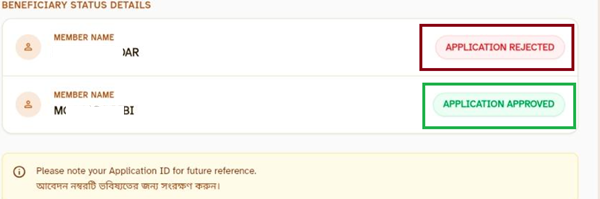
If the portal displays "Application Approved", it means your application has been successfully verified by the concerned authorities. Eligible applicants can receive the financial assistance once the instalment is released.
2. Application Rejected
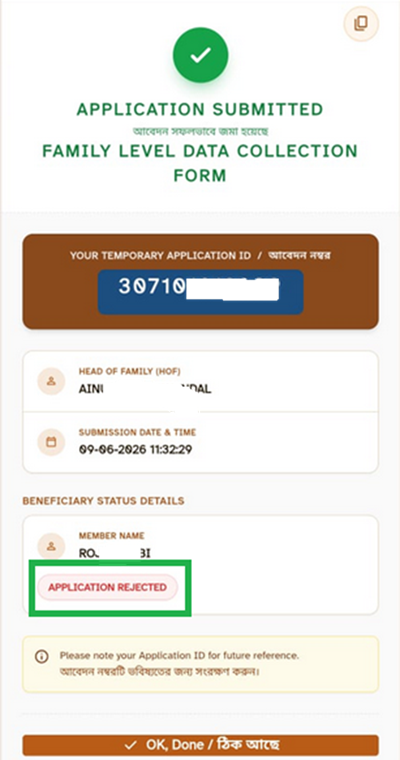
If the portal shows "Application Rejected", it means your application has not been approved by the department. This may happen due to incorrect information, incomplete documents, or failure to satisfy the eligibility conditions. The official portal does not currently display the exact reason for rejection.
3. Under Enquiry
If your Annapurna Yojana application status is displayed as "Under Enquiry", it indicates that the concerned department is carrying out an additional review of your application. This status is generally assigned when an applicant submits a grievance or requests a reconsideration after their application is rejected.
During the enquiry, the authorities may examine the submitted documents, verify the applicant's eligibility, and conduct a field inspection if required. The application remains under review until the verification process is completed.
After the enquiry is concluded, the department updates the application status on the portal. Depending on the findings, the application may either be approved if the applicant is found eligible or continue to remain rejected if the prescribed conditions are not met.
4. Payment Failure
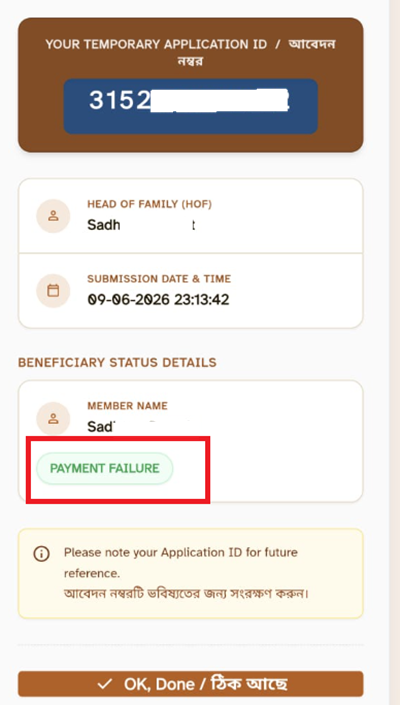
If your application has already been approved but you have not received the financial assistance, the portal may display "Payment Failure". This means the instalment could not be credited to your bank account.
Payment failure may occur due to one or more of the following reasons:
- Your bank account is not linked with Aadhaar.
- Your bank account is not enabled for Direct Benefit Transfer (DBT).
- NPCI Aadhaar mapping is inactive or incorrect.
- Incorrect bank account details are available with the department.
How to Check Annapurna Yojana Application Status?
If you have already applied for the West Bengal Annapurna Yojana, you can easily check the current status of your application online through the official Social Registry Portal. The online status check facility allows applicants to know whether their application has been approved, or rejected. You only need your registered mobile number to access your application details.
Follow the step-by-step process given below to check your Annapurna Yojana application status online:
- First, visit the official Annapurna Yojana Family Level Data Collection Portal.
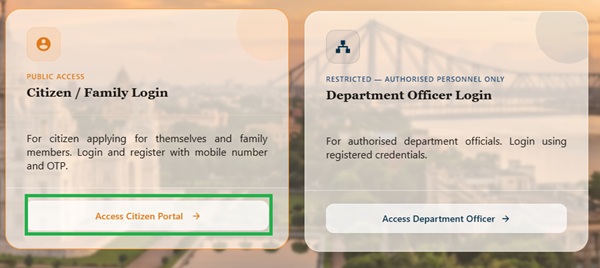
- Once the homepage opens, click on the "Access Citizen Portal" button.
- You will be redirected to the applicant login page. Select your District from the dropdown list.
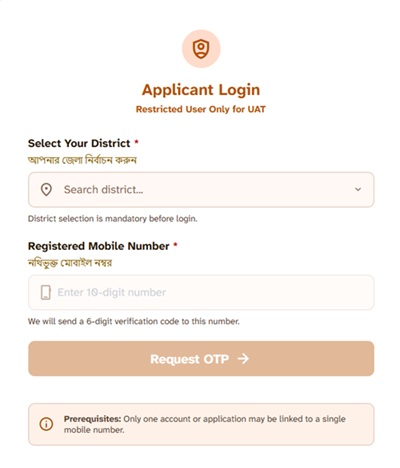
- Enter the registered mobile number that you used while submitting your Annapurna Yojana application.
- Complete the Security Captcha by entering the characters exactly as displayed on the screen.
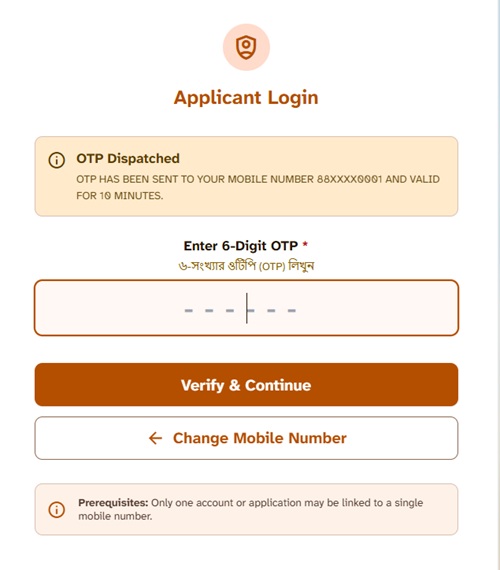
- Click on the "Request OTP" button. An OTP will be sent to your registered mobile number.
- Enter the OTP in the designated field and complete the verification process.
- After successful login, a list of all members registered under your Family Level Data Collection record will appear on the screen.
- If your family has two or more registered applicants, the application status of each member will be displayed separately in the same dashboard.
- You can view the current status of every registered member individually.
- Each applicant will be marked as Application Approved, Application Rejected, or Payment Failure.
How to Know Whether Your Application is Approved or Rejected?
Many applicants want to know whether their Annapurna Yojana application has been approved or rejected. The process is very simple. Log in to the official applicant portal using your registered mobile number and OTP. As soon as you sign in, the latest application status will appear on your dashboard.
If your application has been successfully verified by the authorities, the portal will display "Application Approved". If any issue is found during verification, it will display "Application Rejected".
Possible Reasons for Annapurna Yojana Application Rejection
The official Annapurna Yojana portal does not currently display the exact reason why an application has been rejected. However, based on the scheme guidelines and the verification process, an application may be rejected for one or more of the following reasons:
- Incorrect or incomplete personal information submitted in the application.
- Mismatch between Aadhaar details and the information provided in the application.
- Required documents were missing, incomplete, or could not be verified.
- The applicant did not fulfil the eligibility conditions prescribed under the scheme.
- The applicant or any family member is an Income Tax payer.
- The applicant is a Government employee or belongs to a family that is not eligible under the scheme.
- Duplicate applications were submitted for the same beneficiary.
- Incorrect or invalid bank account details were provided.
- The Family Level Data Collection (FLDC) information did not match the records available with the department.
- The applicant's details could not be verified during the scrutiny or verification process.
Important: The reasons listed above are only the most common or possible causes of rejection. Since the official portal does not specify the exact reason, applicants should visit their nearest BDO Office, SDO Office, or KMC Office with their acknowledgement receipt and supporting documents to know the actual reason for rejection and seek further assistance.
What Should You Do if Your Annapurna Yojana Application is Rejected?
If your application status shows "Application Rejected", do not panic. At present, the official Annapurna Yojana portal does not allow applicants to edit or correct the submitted application. Moreover, the portal also does not inform applicants about the exact reason for rejection, making it difficult to know what needs to be corrected.
If you are facing this issue, you should visit your nearest BDO Office, SDO Office, or KMC Office (whichever is applicable in your area) and enquire about your application with the concerned officials. They can verify your application details and guide you on the next course of action.
While visiting the office, make sure to carry the following documents:
- Temporary Application ID or acknowledgement receipt issued during application submission.
- Aadhaar Card.
- Ration Card.
- Bank Passbook.
- Registered Mobile Number.
- Income Certificate (if applicable).
- Residence Proof.
- Any other documents submitted with your application.
Since there is currently no online correction facility for Annapurna Yojana application, visiting the concerned government office is the only reliable way to enquire about the rejection and obtain further guidance.
What Should You Do if the Portal Shows "Payment Failure"?
If your application is approved but the portal displays "Payment Failure", it means the financial assistance could not be credited to your bank account. In most cases, this happens because the beneficiary's bank account is not linked with Aadhaar, is not enabled for Direct Benefit Transfer (DBT), or the NPCI Aadhaar mapping is inactive.
You should first check whether your bank account is Aadhaar-linked and DBT-enabled. If your bank account is not properly linked, visit your bank branch and complete the Aadhaar seeding and DBT activation process. Once your bank details are updated, future instalments can be credited successfully as per the department's payment schedule.
A detailed step-by-step process to check NPCI Aadhaar Bank Mapping status and enable DBT has already been explained in our main West Bengal Annapurna Yojana article. You can follow that guide to verify your bank account and resolve the payment failure issue.
Frequently Asked Questions
You can check your Annapurna Yojana application status by visiting the official Family Level Data Collection Portal. Log in through the Access Citizen Portal using your district, registered mobile number, and OTP. After successful login, the latest application status of all registered family members will appear on the screen.
If your status shows "Application Rejected", it means your application has not been approved after verification. The rejection may be due to incorrect information, incomplete documents, duplicate records, or failure to meet the eligibility criteria. However, the portal does not currently mention the exact reason for rejection.
No. At present, the Annapurna Yojana portal does not provide any option to edit or correct a submitted application. Applicants should visit the concerned BDO Office, SDO Office, or KMC Office to enquire about the rejection and seek further guidance.
You should carry your Temporary Application ID or acknowledgement receipt, Aadhaar Card, Ration Card, Bank Passbook, registered mobile number, and any other documents submitted during the application process while visiting the concerned office.
The "Payment Failure" status means your application has been approved, but the financial assistance could not be credited to your bank account. This usually happens when the bank account is not Aadhaar-linked, is not DBT-enabled, or NPCI Aadhaar mapping is incomplete.
First, verify whether your bank account is linked with Aadhaar and enabled for Direct Benefit Transfer (DBT). If required, visit your bank branch to complete Aadhaar seeding and DBT activation. You can also check your NPCI Aadhaar Bank Mapping status online before contacting the concerned authorities.
Yes. After logging in through the Access Citizen Portal, the dashboard displays the application status of all family members registered under the same Family Level Data Collection record. If more than one member has applied, the status of each applicant is shown separately.
If your application has been rejected and the portal does not specify the reason, you should visit your nearest BDO Office, SDO Office, or KMC Office (whichever is applicable) along with your application documents for further assistance.
Add new comment