

The Government of West Bengal has launched Annapurna Yojana, a welfare scheme under which eligible women will receive monthly financial assistance of Rs. 3,000. The scheme was officially commenced across the state on 1 June 2026 with the objective of providing financial support to economically vulnerable households.
When the scheme was initially announced, the government released the Annapurna Yojana application form through the Social Security Portal, allowing beneficiaries to obtain and submit the prescribed form through the notified process. At the same time, the government indicated that online applications would also be accepted, prompting many citizens to search for the official Annapurna Yojana online application link and registration portal.
To facilitate digital registration, the government has introduced the West Bengal Social Registry Portal, also called the "Family Level Data Collection Portal". The portal now provides access to the Annapurna Yojana Citizen Portal, through which applicants can start the online application process using their registered mobile number and OTP verification. The platform has emerged as the primary online gateway for beneficiary registration and family-level data collection under the scheme.
The Annapurna Yojana online application form requires applicants to provide detailed information relating to family identity, ration card details, bank account information, occupation, income, assets, social status, educational details, and benefits received under other government schemes. Since the application is based on family-level verification, beneficiaries are advised to keep information related to all family members readily available before starting the registration process.
Apart from facilitating online applications, the Annapurna Yojana Social Registry Portal may also support additional beneficiary services in the future. These may include applicant account management, application status tracking, profile updates, document management, and other scheme-related services as introduced by the government from time to time.
This article explains the Annapurna Yojana Online Application Portal, step-by-step application process, information required during registration, applicant access process, future portal services, important links, and other details that beneficiaries should know before submitting their application.
About Annapurna Yojana Online Application Portal
The Annapurna Yojana Online Application Portal serves as the official digital platform for collecting and managing beneficiary information under the scheme. The portal has been developed through the West Bengal Social Registry system and is designed to support family-level registration and verification.
Unlike a simple application website, the portal collects detailed information relating to family composition, ration card records, bank account details, occupation, income, assets, educational status, and benefits received under other government programmes. This information helps the authorities create a verified beneficiary database and process applications more efficiently.
The portal uses a structured registration process in which applicants are required to complete multiple sections covering different categories of information. By collecting data in a standardized format, the system can facilitate verification and reduce errors that may arise from incomplete or incorrect submissions.
The platform also provides a dedicated Citizen Portal through which applicants can access the online application form using OTP-based verification. The application is designed to capture information relating to the entire family rather than a single individual, making it important for applicants to keep details of all family members readily available before starting the registration process.
As the portal continues to evolve, additional beneficiary services may also be introduced. These may include applicant account management, application tracking, profile updates, document management, beneficiary communication, and other scheme-related facilities as notified by the government from time to time.
What is West Bengal Social Registry Portal?
The West Bengal Social Registry Portal is a centralized digital database system that enables the government to maintain structured information about beneficiary households. Instead of collecting fragmented information through multiple departments, the portal brings family-related data together in a single digital platform.
One of the key features of the portal is its family-centric approach. The registration process is not limited to a single applicant. Instead, it captures information relating to all members of a household, including identity details, family composition, financial information, social indicators, and other relevant records. This approach helps create a more comprehensive profile of beneficiary families.
The portal also follows a structured data collection mechanism. Applicants are required to complete multiple sections covering different aspects of family information. This allows authorities to review applications using standardized information and maintain consistency across beneficiary records.
Another important aspect of the Social Registry Portal is its ability to maintain digital beneficiary records in a single location. Once information is submitted and verified, the data can help reduce duplication, improve record management, and support more efficient beneficiary administration.
By digitizing family-level information and organizing it through a unified platform, the Social Registry Portal represents an important step towards modernizing beneficiary data management and improving the overall efficiency of welfare programme administration.
Annapurna Yojana Online Application Portal at a Glance
| Portal Name | West Bengal Social Registry Portal |
| Scheme | Annapurna Yojana |
| State | West Bengal |
| Application Mode | Online |
| Citizen Portal | Available |
| Applicant Login | Available |
| Department Officer Login | Available |
| Official Website | socialregistry.wb.gov.in |
How to Apply Online for Annapurna Yojana Through Social Registry Portal?
Eligible applicants can submit their Annapurna Yojana application through the Social Registry Portal. After accessing the Citizen Portal and completing OTP verification, applicants are required to provide detailed family, identity, financial, and social information as part of the registration process.
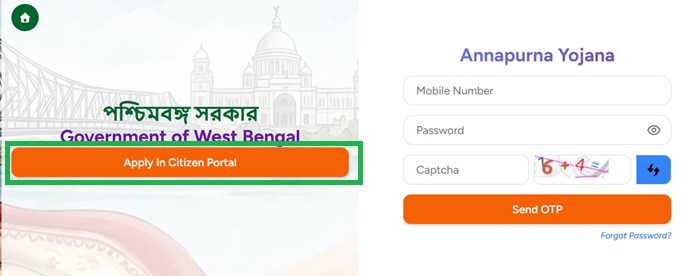
- Visit the Social Registry Portal and click on the Access in Citizen Portal option.
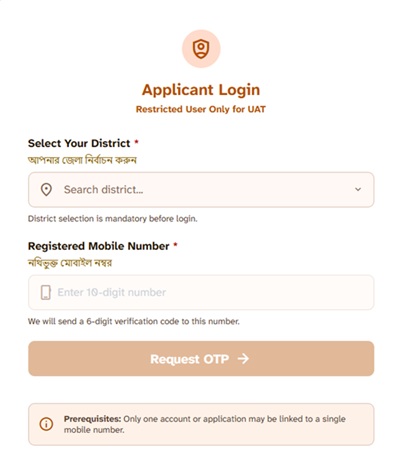
- Select your district, enter the registered mobile number.
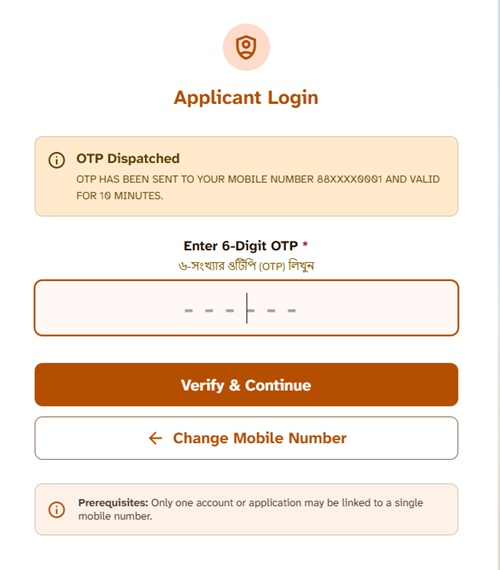
- Enter the OTP received on the mobile number to complete the verification.
- After successful login, the application form will open on the screen.
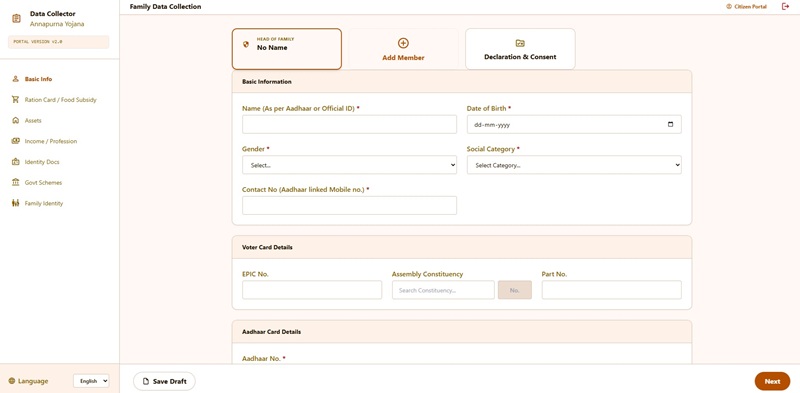
- The registration process is divided into six stages, namely
- Basic Info
- Ration Card Information
- Assets
- Income and Profession
- Other Identity Documents
- Government Scheme Benefits.
- Applicants must complete each stage before proceeding to the final declaration and submission.
- In the first stage, applicants need to provide Family Identity Details including
- Name of Head of Family.
- Date of Birth.
- Gender.
- Aadhaar Number.
- Digital Ration Card Household ID.
- Residential Address.
- Mobile Number.
- Total number of family members.
- Applicants are then required to furnish information about all family members such as
- Name.
- Date of Birth.
- Gender.
- Relationship with Head of Family.
- Aadhaar Number.
- Provide bank account information of the Head of Family and adult family members including:
- Bank Name.
- Account Number.
- IFSC Code.
- Aadhaar-linked bank account details.
- Enter voter-related information including:
- EPIC (Voter ID) Number.
- Assembly Constituency Details.
- Part Number of Electoral Roll.
- Select the applicable social category:
- UR.
- EWS.
- SC.
- ST.
- OBC.
- PVTG.
- The next stage collects Ration Card Information including
- Digital Ration Card availability.
- Ration Card category such as AAY, PHH, SPHH, RKSY-I, RKSY-II, or Non-Subsidized.
- Monthly ration lifting status.
- Under the Assets section, applicants need to provide information related to
- Number of pucca rooms in the house.
- Land ownership details.
- Total landholding of family members.
- Vehicle ownership information.
- Four-wheeler details, if applicable.
- Health insurance coverage details.
- The Income and Profession section requires details regarding
- Income Tax or Professional Tax status.
- PAN details of family members.
- Employment status of adult members.
- Government service details, if any.
- Private employment details.
- Self-employment information.
- Total annual family income.
- Fill educational and social information such as:
- Literacy status of adult family members.
- Highest educational qualification.
- School details of children.
- Children's vaccination status.
- In the Other Identity Documents section, applicants may need to provide
- PAN Card
- CAA application status
- KCC,
- Artisan Credit Card,
- Student Credit Card, and
- other government-issued identity or beneficiary cards, wherever applicable.
- The Social Status and Dependents stage collects information regarding school-going children, educational institutions, class details, and vaccination status of children in the family.
- Under the Government Scheme Benefits section, applicants are required to disclose details of welfare schemes already being received by family members through Direct Benefit Transfer (DBT).
- Before final submission, applicants should carefully review all information entered in the application form and ensure that the details match their official records.
- After verifying the information, applicants can accept the declaration, submit the application form, and save the acknowledgement details for future reference.
Since the application form is based on family-level data collection, applicants should keep Aadhaar details, ration card information, voter identity details, bank account information, income details, and particulars of all family members readily available before starting the online application process.
Stages of Annapurna Yojana Online Application Form
The Annapurna Yojana online application form is divided into seven stages. Applicants are required to complete each section before proceeding to the final declaration and submission process.
| Stage | Information Collected |
|---|---|
| Stage 1 | Family Identity |
| Stage 2 | Ration Card Information |
| Stage 3 | Assets |
| Stage 4 | Income and Profession |
| Stage 5 | Other Identity Documents |
| Stage 6 | Social Status and Dependents |
| Stage 7 | Government Scheme Benefits |
Information Required for Annapurna Yojana Online Application
- Applicant Name.
- Date of Birth.
- Gender.
- Mobile Number.
- Aadhaar Number.
- Voter Card Number.
- Ration Card Details.
- Family Member Information.
- Residential Address.
- Bank Account Details.
- Category Information.
- Other details required by the portal.
Who Can Apply Through Annapurna Yojana Online Portal?
Before submitting the Annapurna Yojana online application form, applicants should carefully verify whether they satisfy the eligibility conditions prescribed under the scheme. The Social Registry Portal allows online registration, but the final approval of the application is subject to verification of eligibility criteria and supporting records.
Eligibility Requirements
Women beneficiaries fulfilling the following conditions may apply through the Annapurna Yojana Online Application Portal:
- The applicant must be a permanent resident of West Bengal.
- Only women applicants are eligible under Annapurna Yojana.
- The age of the applicant should be between 25 and 60 years.
- The applicant should possess an Aadhaar-linked bank account for receiving Direct Benefit Transfer (DBT) payments.
- Existing eligible beneficiaries of Lakshmir Bhandar may be migrated to Annapurna Yojana after verification by the authorities.
- Beneficiaries who have filed appeals before the SIR Tribunal or submitted applications under the Citizenship (Amendment) Act may continue receiving assistance in accordance with applicable government provisions.
Who May Not Be Eligible?
Applicants falling under any of the following categories may not qualify for benefits under the scheme:
- Women below 25 years of age.
- Women above 60 years of age.
- Permanent government employees.
- Women receiving a regular government salary.
- Government pensioners receiving regular pension benefits.
- Income taxpayers.
- Persons who are not permanent residents of West Bengal.
- Applicants submitting incorrect information or fake documents.
- Beneficiaries found ineligible during verification.
Applicants are advised to verify their eligibility carefully before completing the online registration process to avoid rejection during verification.
Documents Required for Annapurna Yojana Online Application
Applicants should keep the following documents ready before starting the online application process. Some documents may be required for verification depending on the information provided in the application form.
- Aadhaar Card.
- Voter ID Card.
- Ration Card.
- Bank Passbook.
- Mobile Number.
- Residence Proof.
- Income Certificate.
- Passport Size Photograph.
- Family Details.
- Caste Certificate (if applicable).
- Disability Certificate (if applicable).
- Widow Certificate (if applicable).
Annapurna Yojana Applicant Login Process
The Social Registry Portal currently allows applicants to access the Annapurna Yojana online application form through OTP verification. However, a dedicated beneficiary dashboard has not yet been introduced for applicants. As the portal continues to expand, additional login-based services may become available in the future.
If a separate applicant login facility is introduced, registered beneficiaries may be able to access their account through the Social Registry Portal to manage application-related services and beneficiary information.
- Visit the official Social Registry Portal.
- Open the Applicant Login section.
- Select the district, if required.
- Enter the registered mobile number or other login credentials prescribed by the government.
- Complete OTP verification or other authentication requirements.
- Access the beneficiary account or dashboard.
- View application details and beneficiary information.
- Check application status and verification updates.
- Access payment-related information, if such services are introduced.
- Use other scheme-related services made available through the portal.
Applicants should note that the actual login process, authentication requirements, and available services may vary depending on future portal updates and government instructions.
How to Check Annapurna Yojana Application Status?
The Social Registry Portal currently allows applicants to submit their Annapurna Yojana application online. However, a dedicated application status tracking facility has not yet been introduced for beneficiaries. The government may provide this feature in future updates to help applicants monitor the progress of their applications.
Once the application status facility becomes available, applicants may be able to track their application through the Social Registry Portal using their registered mobile number and other verification details.
The status tracking system may allow applicants to:
- Check whether the application has been successfully submitted.
- Monitor verification progress.
- View approval or rejection status.
- Track document verification updates.
- Receive notifications regarding deficiencies or corrections.
- View beneficiary-related updates through the portal.
Applicants should regularly visit the Social Registry Portal and follow official government announcements for updates regarding application status tracking and other beneficiary services.
Can we check the Annapurna Yojana Payment Status on the Social Registry Portal?
The Government of West Bengal has started transferring monthly financial assistance under the Annapurna Yojana through the Direct Benefit Transfer (DBT) system. The first installment was credited to more than 28 lakh eligible women on 3 June 2026, while the second installment was released on 1 July 2026, benefiting around 1.3 crore eligible women. Following these payments, many beneficiaries have been searching for the Annapurna Yojana payment status, installment status, and online payment verification facility.
At present, the Social Registry Portal does not provide a dedicated online facility to check the Annapurna Yojana payment status. Beneficiaries cannot currently view their installment details, payment history, or DBT credit status through the official portal.
Until an official payment status tracking facility is introduced, beneficiaries can verify whether the installment has been credited by checking their Aadhaar-linked bank account, bank passbook, SMS alerts from their bank, ATM mini statement, mobile banking application, or by contacting their respective bank branch.
The Government of West Bengal may introduce an online payment status checking facility in the future. Once such a service becomes available, beneficiaries may be able to check their installment details, payment dates, DBT transaction status, and other payment-related information through the official Annapurna Yojana portal.
What Services May Become Available Through the Portal in Future?
The Social Registry Portal is expected to serve as the primary digital platform for Annapurna Yojana beneficiaries. Applicants may be able to access various services through their account.
| Service | Purpose |
|---|---|
| Online Application | Submit beneficiary application. |
| Applicant Dashboard | Access account information. |
| Application Status | Track application progress. |
| Profile Management | Update personal information. |
| Document Management | Upload or update documents. |
| Notifications | Receive important updates. |
| Verification Updates | Monitor verification progress. |
Important Advisory for Applicants
- Use only the official Social Registry Portal.
- Provide accurate information while submitting the application.
- Keep your registered mobile number active.
- Do not share OTPs with any person.
- Preserve acknowledgement details after submission.
- Regularly check the portal for updates.
Important Links
Frequently Asked Questions
The official online application platform for Annapurna Yojana is the West Bengal Social Registry Portal. Eligible applicants can access the Citizen Portal through this platform to submit their online application.
Applicants can access the Annapurna Yojana Citizen Portal through the official Social Registry Portal at socialregistry.wb.gov.in.
Applicants can apply online by visiting the Social Registry Portal, selecting the "Apply in Citizen Portal" option, completing OTP verification, and submitting the online application form with the required family and beneficiary information.
Yes. Applicants should have an Aadhaar-linked bank account because financial assistance under the scheme is transferred through the Direct Benefit Transfer (DBT) system.
Applicants may need to provide family identity details, Aadhaar information, ration card details, bank account information, voter identity details, income information, occupation details, and information relating to all family members.
At present, the portal does not provide a dedicated payment status tracking facility. Beneficiaries may verify payments through their bank account, passbook, or SMS alerts received from their bank.
The first installment under Annapurna Yojana was credited to eligible beneficiaries on 3 June 2026 through the Direct Benefit Transfer (DBT) system.
No, there is no registration fees for Annapurna Yojana.
If you have not received the instalment, first ensure that your application has been approved and that your Aadhaar is linked to your bank account for DBT. Generally, payments credited via DBT takes one or two days time to transfer.
No. At present, the Social Registry Portal does not provide any option to check the Annapurna Yojana payment status online.
Comments
When I get Annapurna bhandar
When I get Annapurna bhandar
Bangali
Amy Annapurna Payni
Enrollment of my name in Annapurna Yojona.
My name has not been enrolled in Annapurna Yojona portal till now.
অন্নপূর্ণা যোজনা
Amar dar akhono অন্নপূর্ণা যোজনা নো ডুকা নি
Anapurna yojana
আমি আমার আননপূরনার ফর্ম চেক করে দেখতে চাই।
Anapurna yojana
আমি আমার অন্নপূর্ণার ফর্ম পুনরায় চেক করতে চাই। তার জন্য অনলাইন অপসান ছাড়েন।
Mara Annapurna check karna hai
Mara Annapurna check karna hai
Arnopurna yojnana cration
I miss family members sorry to say I want joining the members please give me cration
Arnopurna yojnana cration
Joining the members
Annapurna jojona
Sir , ami 14,6,2026 e online form fillup korte giye amr ektu vul hoye gechhe 3 ter besi gho niye thaki naa korte hoto ami haa kore chhi
Ami ekta bedroom niye thaki
Sir please form editing er kono bebostha korun
Amar status e under enquiry dekhachhe,.
Annapurna
Taka dhokene
Annapurna bhandar
Annapurna bhandar stutas under incory dekhacche
good schime
good schime
How can it be edit
How can it be edit
Annapurna jojonar 3000 taka dhokeni
Ami from jama korechhi 2nd jun e kintu ekhono taka amar bank account e dhokeni.
Annapurna bhander
Ami taka Pai ne
Annapurna bhandar
আমি আগের মাসে ৯তারিখে অন্নপূর্ণা ভান্ডার ফর্ম ফিল করি কিন্তু এখনো টাকা পেলাম না কবে পাবো?
Arnopurna yojnana cration
I want joining female member please give me
Arnopurna yojnana edit cration
I want joining female member please give me permission to portal
Of line application
Ami june mase 3000 taka pelam kintu julay mase ekhono taka pelam na . On line from fillup korte gele hoy na soya kore amar beeper ta dekhun
সিউড়ি
ঘর পাইনি দাদা
পেমেন্ট ব্যর্থতা
চার তারিখ থেকে পেমেন্ট ব্যর্থতা দেখাচ্ছে ডিভিডি লিংক ঠিক আছে এখনো ঠিক হয়নি।
Annapurna vandar
Takapaini Ami june maser 6tarike online korchi from ekhono taka paini Ami sudu submit dekyche
Annapurna Yojona from fillup vul fillup
Jar jonno taka dhukeni
Ami taka payni
Westbengall
Annapurn vandar status
I am Annapurna vandar application members no money for my bank account please sir transfer money from Annapurna vandar
Annapurna Bhandar status check
Annapurna Bhandari taka pine
Annapurna Yojona Online Status check
আমি অনলাইন আমার অন্নপূর্ণা যোজনার স্ট্যাটাস চেক করতে চাই
Annapurna Bhandar
I have been submitted my mother's document in offline process for ANNAPURNA BHANDAR , so I did not applied in online process.
Now when I am trying to do ,it is showing " An application has been registered".
Please help me in this matter.
Application id- 313105571535
অন্নপূর্ণা যোজনা
আমি আনপূণা যোজণার ফম ফিলাপ করে ছিলাম অফলাইণে আর পথম মাসে টাকা ও পেয়েছিলাম কিন্ত পরের মাসে কোণ টাক পাইণি
Annapurna yojona
Ami from filap korachi offline 9 jun are online filup korachi 3 july ami akhono taka paini. sudhu submitted dekache.
Annopurna Bhandar steas chak
Annopurna Bhandar steas chak
Request Regarding Non-Receipt of Annapurna Yojana Benefit.
Respected BDO Sir,
I respectfully request that I have not yet received the benefit amount under the Annapurna Yojana. I kindly request you to look into the matter and take the necessary steps so that I may receive the pending amount at the earliest.
Thank you for your kind consideration.
Yours faithfully,
Name: __mampi debnath
Address: _Rajberia. Masunda. 24 pgs (north) wb.743711
Mobile No.: _80557741XX
Date: _03/08/2026
Annapurna yojona status check
Please help to check Annapurna yojana status and confirm payment details
Annapurna jojona
Ami Annapurna jojona akhona paini
Mera ab tk ek v payment nhi…
Mera ab tk ek v payment nhi mila or under process hi hai
Annapurna bander
Jun 6 dey kora hoyeche akbaro payni
Annapurna bhandar didn't receive 4 month under process
Not received Annapurna bhandar since 4 month showing under process kgp municipality is not doing any work or survey
Arnopurna. Yojona
আমরা এক মাসের টাকা পেয়েছি আর এক মাসের টাকা পাননি অন্নপূর্ণা যোজনা দু মাসের টাকা পাইনি। আমাদের টাকা কবে ঢুকবে ফর্দা ভেরিফিকেশনে আটকে আছে
রিজেক্ট করে দিয়েছে অন্য…
রিজেক্ট করে দিয়েছে অন্য অন্নপূর্ণা
আমি জুলাই মাসে অন্নপূর্ণার টাকা পেছি। এখন আর পাইনি।
আমি জুলাই মাসে অন্নপূর্ণার টাকা পেছি। এখন আর পাইনি।আমার কোনো কিছু ভুল নেই। একটা ঘর আছে।তবুও আমি পাইনি।
Add new comment